10 FiveM Scripts in One UI Pack for ESX QBCore and QBX
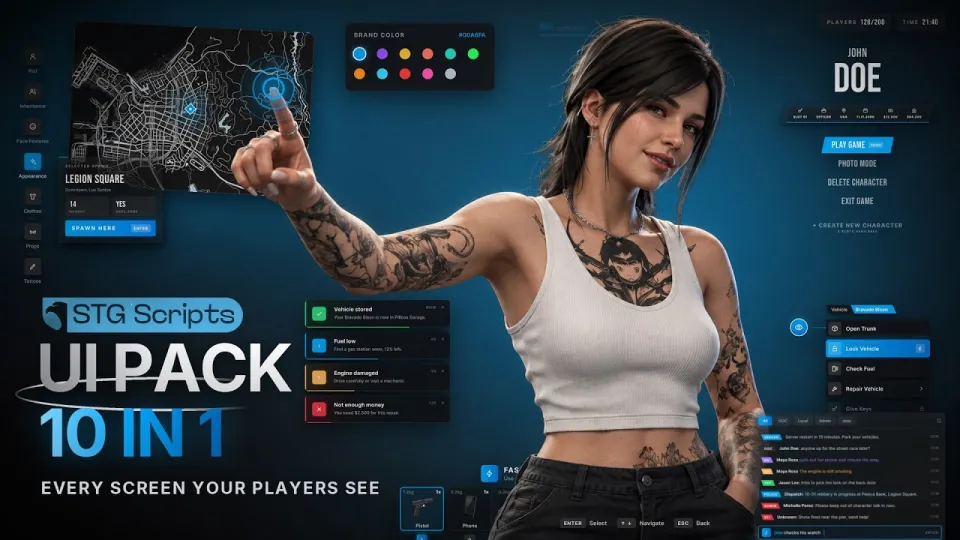
Video: FiveM Scripts UI Pack — 10 in 1 UI Redesign | Character Creator, Inventory & HUD | ESX, QBCore, QBX
· based on the channel STG Scripts
Key takeaways
- The UI pack includes 10 scripts: loading screen, multicharacter, character creator, spawn selector, HUD, inventory, chat, target, ox_lib redesign, and pause menu.
- It supports ESX, QBCore, and QBOX frameworks out of the box.
- One hex value in the config recolors all ten UI elements.
- The HUD is free and includes three speedometer options.
- The inventory redesign adds clothing slots and backpacks, and works with ox_inventory.
Looking for FiveM scripts that overhaul your server's entire interface? The STG Scripts UI Pack bundles 10 redesigned scripts—loading screen, multicharacter, character creator, spawn selector, HUD, inventory, chat, target, ox_lib, and pause menu—into one cohesive package for ESX, QBCore, and QBX. You can get the full pack on the STG Scripts website.
What is included in the 10-script UI pack?
The pack replaces every major player-facing interface with a matching design. It includes:
- Loading Screen – shows news, rules, and music while players connect.
- Multicharacter – character selection with photo mode and slot keys.
- Character Creator – full appearance editor with clothing, barber, tattoo, and surgeon shops.
- Spawn Selector – live map for choosing a spawn point.
- HUD – free heads-up display with three speedometer styles.
- Inventory – ox_inventory redesign with clothing slots and backpacks.
- Chat – channel tabs for organized communication.
- Target – ox_target redesign that requires no code changes.
- ox_lib Redesign – restyled menus and notifications, also no code changes needed.
- Pause Menu – custom pause screen matching the overall theme.
All ten scripts share a single color config: change one hex value and every UI element updates automatically.
How does the one-color config work across all scripts?
The core feature is centralized theming. Each script reads from a shared configuration file where a single hex color value defines the accent color. When you change that value, the loading screen, multicharacter, HUD, inventory, chat, target, ox_lib, and pause menu all update to match. This eliminates the need to edit CSS or multiple files individually. Server owners can rebrand the entire UI in seconds, ensuring a consistent look without technical hassle.
Which frameworks and dependencies are supported?
The pack works out of the box with ESX, QBCore, and QBOX. For inventory functionality, it integrates with ox_inventory, and the target and ox_lib redesigns are built for ox_target and ox_lib respectively. No additional code changes are required for the target and ox_lib overhauls—they drop in and work. The HUD is offered as a free standalone resource, so you can test the quality before committing to the full pack.
What are the standout features of each script?
- Loading Screen: Displays server news, rules, and background music while players connect.
- Multicharacter: Allows up to multiple character slots with photo mode for each character and quick slot selection via keybinds.
- Character Creator: Comprehensive appearance editor including clothing stores, barber shop, tattoo parlor, and plastic surgeon.
- Spawn Selector: Interactive live map where players pick their starting location.
- HUD: Free HUD with three speedometer designs (analog, digital, and minimal).
- Inventory: ox_inventory redesign with dedicated clothing slots and backpack support.
- Chat: Tabbed channels for separating OOC, IC, and admin messages.
- Target: ox_target redesign with a clean, modern look—no code changes needed.
- ox_lib Redesign: Restyled context menus, notifications, and progress bars—no code changes needed.
- Pause Menu: Custom pause menu that ties the whole UI together.
How do players experience the new UI from connection to gameplay?
From the moment a player connects, they see the loading screen with your news and music. After connecting, they choose a character from the multicharacter screen, then customize their look in the character creator. Next, they select a spawn point on the live map. Once in-game, every interface they interact with—HUD, inventory, chat, target, ox_lib menus, and pause menu—shares the same visual style. This creates a seamless, professional experience that reinforces your server's brand.
Where can I get the UI pack and what support is available?
The pack is available for purchase on the STG Scripts website. You can also join the STG Scripts Discord for support and updates. The HUD is free, so you can try it before buying the full pack. The pack is designed for easy installation and includes documentation.
What do server owners commonly ask about this UI pack?
Server owners often wonder about compatibility with their existing scripts. The pack is built to work alongside popular resources like ox_inventory, ox_target, and ox_lib without conflicts. Another common question is whether the UI can be customized beyond the single color—yes, each script has its own config for layout and text. Performance is also a concern; the scripts are optimized for low resource usage. Finally, installation is straightforward: drop the resources into your server and configure the shared color value.
Conclusion
The STG Scripts UI Pack offers a complete visual overhaul for FiveM servers, combining 10 essential scripts into one cohesive package. With support for ESX, QBCore, and QBX, a single-color config, and standout features like the free HUD and ox_inventory redesign, it's a practical solution for server owners wanting a professional look. The video breakdown by STG Scripts walks through each script, showing how they work together. To get the pack, visit the STG Scripts website.
Questions & answers
Is the HUD really free, and can I use it without buying the full pack?
Yes, the HUD is offered as a free standalone resource. You can download and use it on your server without purchasing the full UI pack. It includes three speedometer styles and matches the design of the paid scripts.
Do I need to change any code to use the ox_target and ox_lib redesigns?
No, the ox_target and ox_lib redesigns are drop-in replacements that require no code changes. They automatically override the default UI elements with the new design, so you can install them like any other resource.
Will this UI pack work with my existing ESX or QBCore server?
Yes, the pack supports ESX, QBCore, and QBOX out of the box. It is designed to integrate with your existing framework and resources like ox_inventory. You may need to adjust a few config settings, but no major changes are required.
How does the one-color config affect all ten scripts?
All scripts share a common configuration file where a single hex color value sets the accent color. When you change that value, every UI element—from the loading screen to the pause menu—updates automatically, ensuring a consistent look without editing multiple files.
Source: FiveM Scripts UI Pack — 10 in 1 UI Redesign | Character Creator, Inventory & HUD | ESX, QBCore, QBX · Markdown version